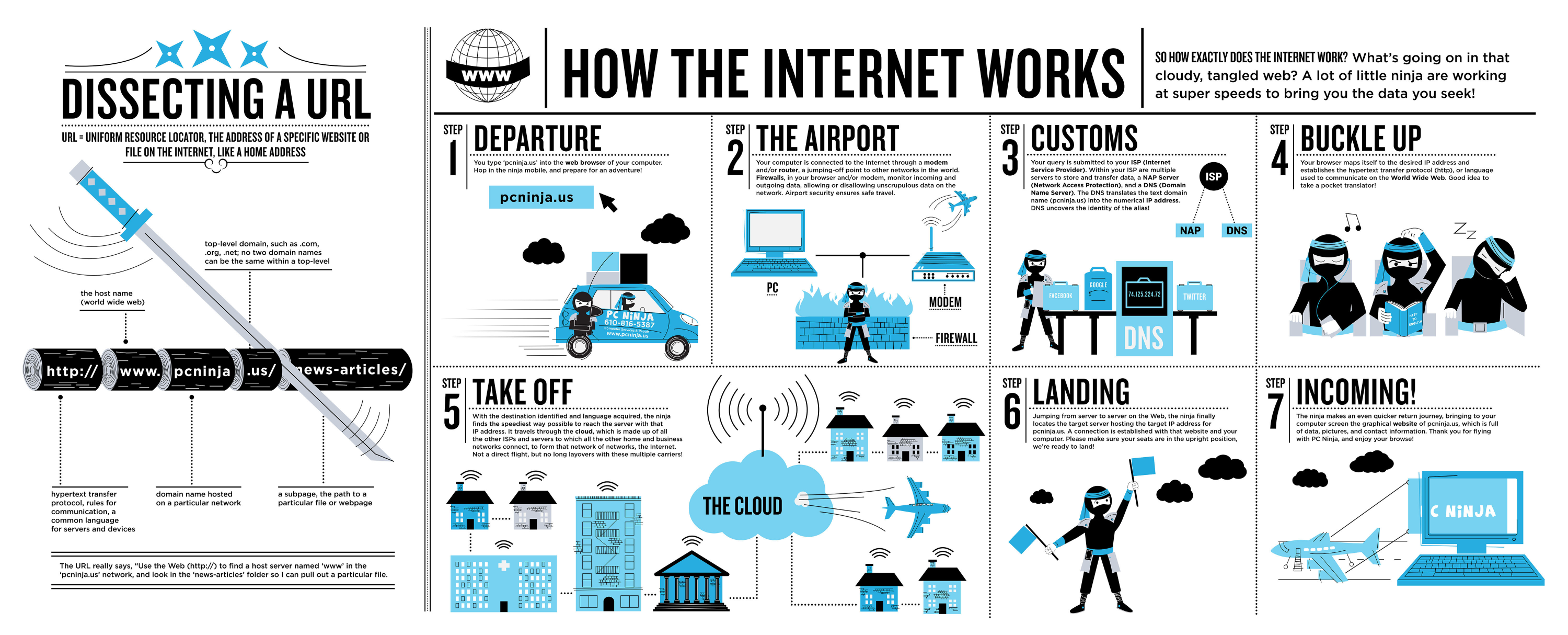
You open up your computer’s (or phone’s) browser and type in rookiemag.com into the address bar. Rookiemag.com is the URL (uniform resource locator) that tells your browser what website you’d like to view.
Your computer can use the URL you’ve entered to look up the associated server’s IP address in a process called DNS (domain name system) lookup, just like you’d use a name to search for a phone number in your contact list. You might be wondering about the differences among the different URL endings, like .org, .com, and .net. Because there are so many URLs and IP addresses to search, DNS lookup uses those endings as its first round of elimination in its search. In our example, DNS lookup starts looking for the IP address for rookiemag.com in a directory of all .com IP addresses. Eventually, the lookup for rookiemag.com will return the IP address of Rookie’s server. If you’re curious to learn more about DNS lookup, here’s a great resource on it, in cartoon form.
Computers are respectful and follow protocol-based communication. So, a computer starts a conversation with another computer by sending a message that’s the equivalent of, “Is now a good time to talk?” The other computer will respond with a message that’s the equivalent of “Sure!”, if it’s available for communication. And the first computer replies with a message that means, “Cool, just wanted to check first.” If the first computer never gets a reply back saying it is OK to talk, it won’t continue to send messages.
Now that there’s a connection from your computer to Rookie’s server, the two computers can talk to each other. Servers use a way of talking called HTTP (hypertext transfer protocol). Just like you’d start a letter to Beyoncé with “Dear Beyoncé,” HTTP requires that computers start messages with a greeting called a header. There are a few different kinds of headers, which your computer knows to use based on what you’ve asked your computer to do. When you type in Rookie’s URL and hit enter, the message your computer sends through the network connection to Rookie’s server uses a header specifically for requesting information, called a GET header. If you’re posting a comment, the message your computer sends a message to to Rookie’s server with a POST header, which is specifically for sending information to a server.
And now, your computer’s message must go on a journey to get to Rookie’s router! In our example, we’re sending a message from your computer to Rookie’s server. Just like traveling on a plane, sometimes that message can be transferred fairly directly, or sometimes there are stops (like layovers) along the way. These “stops” can just be standard network points that are part of the path, or interruptions that can be caused by a number of different things. For example, a message might have to pause or re-route when a network is congested, just like cars might have to in a traffic jam. For the appropriate message to go from your computer to Rookie’s router, we wrap the message in a TCP (remember TCP from Step Three?) packet. The TCP packet acts like the envelope of a letter, with information on where the message is going, as well as who sent it. The packet is essentially just a unit of information that is readable by the server.
Once your message arrives at Rookie’s server, Rookie will respond (how kind!). So long as the message was written with an HTTP header, Rookie’s server will know the proper automatic response. It’s sort of like how you know to say, “Who’s there?” when someone says, “Knock knock.” The standard response is a 200 OK message, which is basically a status message from the server, saying whether or not the request went through. With a 200 OK message, we’re good to go ahead and render the webpage. You might have come across a 404 Document Not Found page before. A 404 response means that the website you asked for doesn’t exist on the server. These are just a couple out of many different standard responses a website may give.
The rest of the information in the message contains the website data. The text, images, and formatting information is all part of the website data, and this is written in the programming languages HTML and CSS. HTML and CSS act like LEGO instructions, which tell how all of the information for the website should fit together. For example, the text "Rookie" tells the browser to put “Rookie” in the title area of the browser. Once the web browser has fully loaded all of the content for rookiemag.com, you can happily browse through the beautiful writing and artwork on the site!