AAA Testing with Python
What is Arrange Act Assert?
The “Arrange-Act-Assert” (also AAA and 3A) pattern of testing was observed and named by Bill Wake in 2001.The pattern focuses each test on a single action. The advantage of this focus is that it clearly separates the arrangement of the System Under Test (SUT) and the assertions that are made on it after the action.
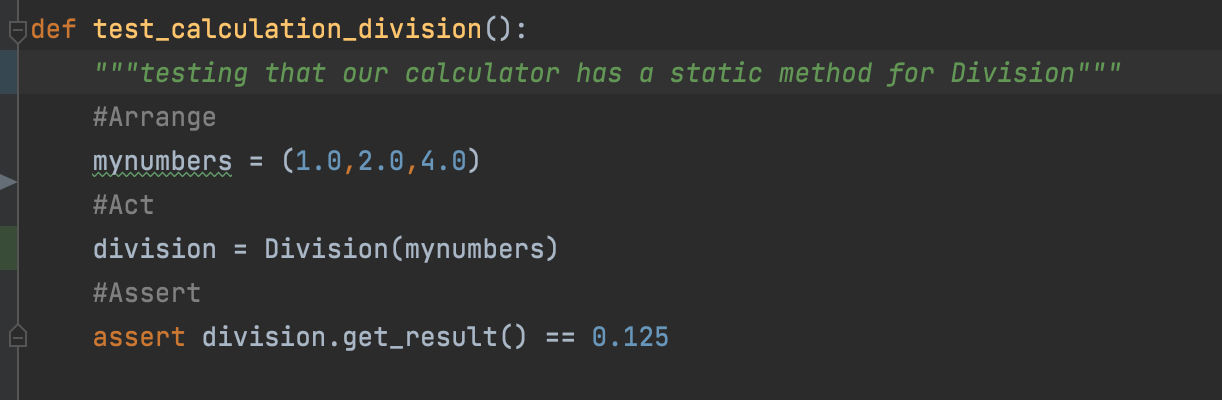
AAA is a pattern for organizing tests. It breaks tests down into three clear and distinct steps:
Arrange inputs and targets. Arrange steps should set up the test case. Does the test require any objects or special settings? Does it need to prep a database? Does it need to log into a web app? Handle all of these operations at the start of the test.
Act on the target behavior. Act steps should cover the main thing to be tested. This could be calling a function or method, calling a REST API, or interacting with a web page. Keep actions focused on the target behavior.
Assert expected outcomes. Act steps should elicit some sort of response. Assert steps verify the goodness or badness of that response. Sometimes, assertions are as simple as checking numeric or string values. Other times, they may require checking multiple facets of a system. Assertions will ultimately determine if the test passes or fails.
Importance of Testing
The requirement of rigorous testing and their associated documentation during the software development life cycle arises because of the below reasons:
- To identify defects
- To reduce flaws in the component or system
- Increase the overall quality of the system
There can also be a requirement to perform software testing to comply with legal requirements or industry-specific standards. These standards and rules can specify what kind of techniques should we use for product development. For example, the motor, avionics, medical, and pharmaceutical industries, etc., all have standards covering the testing of the product.
The points below shows the significance of testing for a reliable and easy to use software product:
- The testing is important since it discovers defects/bugs before the delivery to the client, which guarantees the quality of the software.
- It makes the software more reliable and easy to use.
- Thoroughly tested software ensures reliable and high-performance software operation.
Testing with external data
Pandas
Pandas is an open source Python package that is most widely used for data science/data analysis and machine learning tasks. It is built on top of another package named Numpy, which provides support for multi-dimensional arrays. As one of the most popular data wrangling packages, Pandas works well with many other data science modules inside the Python ecosystem, and is typically included in every Python distribution, from those that come with your operating system to commercial vendor distributions like ActiveState’s ActivePython.
Pandas is a data analysis tool often utilized within Python for importing, manipulating, and storing data.
For external test data importation, we will specifically look at
the read_csv() function. Read_csv() provides the user with a
myriad of tools and can be further advanced with tkinter filedialog, however
for this tutorial only read_csv() as the function and Pandas
(as the imported package) are required.
With Pandas imported, the arrange statement should follow a
structure as:
#Arrange
test_csv_data = Pandas.read_csv(file_path,**kwargs)
kwargs - keyword arguments, specify that within the Pandas.read_csv() function
documentation that parameters can be directly passed for opening the csv file (such as specifying the delimiter
type, header existence, or the data type).
This arranges the test data into a Pandas dataframe, which can be further handled by the program as a set of tuples (row-or-column-wise) as well as maintain the path that the
data was obtained from to Act on. With necessary permissions addressed read/write can also be performed within Pandas to csv.